
Compare Lists Free Online Tool | Find Matches, Differences, and Duplicate Elements
This online compare lists tool helps you compare two lists, PDF files, Python lists, texts, and more in seconds. Simply paste List A and List B and click compare to find matching items, unique items, duplicate values, and remove elements from lists without any manual work.
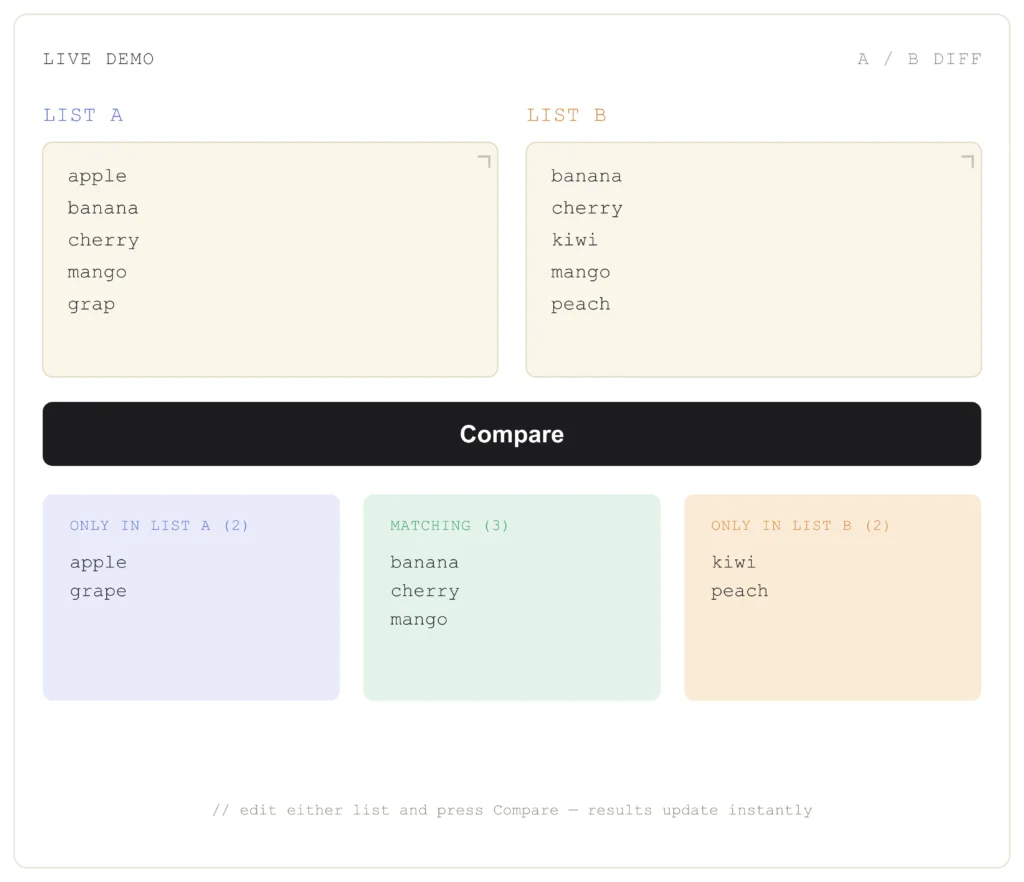
Comparing large lists by hand is slow and often leads to mistakes, especially when working with names, IDs, numbers, keywords, or text. Manually finding missing or duplicate values wastes time and reduces accuracy.
With our free online comparison tool, you can compare two lists instantly, check List A and List B, identify matches and differences, and remove unwanted elements in just a few clicks. It’s free, browser-based, works on any device, and requires no sign-up or technical skills.
How to Compare List A and B Using the Tool
The online tool works with two data sets. It analyzes the data and finds similarities, differences, and duplicates between two sets. It converts complex problems into simple, organized, and clear forms.
Paste List A
Paste your first list into the first field. This list could be any type of data, such as names, text, numbers, etc.
Paste List B
Paste the second list into the second field. This list could be any type of data, such as names, text, numbers, etc.
Click Compare
To start, click Compare. It quickly analyzes and compares the lists. Then you will see the results, including duplicate items, matching items, and unique items.
Compare Two Lists Instantly
Even without any technical knowledge, you can easily tell the difference between the two sets using the comparison tool. It only takes a few clicks to complete the comparison quickly and accurately.
Compare List A and B
Compares two lists to identify matches and different items.
Find Matching Items
It highlights data that match in both lists, such as common values.
Find Differences
It also displays items that appear uniquely in each list. You can use it to identify any missing or extra data.
How to Compare Text and String Lists
Text and string comparison is the most common use of the compare lists tool. It helps you analyze the data efficiently. You can also compare Excel columns, CSV files, TXT files, keyword lists, email lists, product IDs, and other structured data.
Compare Line by Line
To make structured data easier to compare, the tool checks each line individually.
Case-Sensitive Comparison
Some tools allow you to match text based on uppercase and lowercase letters for precise results.
Comparison Methods Available in the Compare Lists Tool
Different comparison methods help you get more accurate results depending on your data. Whether you want to compare exact text, ignore formatting differences, or remove duplicate values, choosing the right option makes list comparison faster and more reliable.
Exact Match
Exact Match compares every character in both lists. The tool marks items as matching when the text is completely identical.
Ignore Case
The Ignore Case option compares text without considering letter case. This helps match values like Apple, APPLE, and apple as the same item.
Ignore Empty Lines
Empty rows can affect comparison results. This option skips blank lines automatically so only actual list items are compared.
Trim Extra Spaces
Extra spaces at the beginning or end of a line can create false mismatches. The tool automatically removes unnecessary spaces before comparing both lists for more accurate results.
Case-Sensitive Comparison
Case-sensitive comparison treats uppercase and lowercase letters as different values. For example, Apple and apple are considered different items.
Remove Duplicate Entries
This option identifies repeated values within the same list. It helps clean your data before or after comparing two lists.
Understanding the Comparison Results
The tool presents the results in categories for easier understanding. Use these simple steps for fast and instant results. In List A, these elements are only available in the first list. In List B, these elements are only available in the second list.
Matching values appear in both lists. The tool helps remove elements from the list by identifying unique, unmatched, and duplicate items, making your data cleaner and easier to manage.
Some key features of our free online compare two lists tool
Our free compare list tool includes everything you need to compare two lists quickly and accurately. Whether you want to find matches, remove elements, or compare large datasets, these features make the process simple.
| Feature | Your Tool | Others |
|---|---|---|
| Free | ✓ | ✓ |
| Unlimited | ✓ | Some |
| Browser Based | ✓ | Some |
| No Signup | ✓ | Some |
| Export | ✓ | Few |
| Mobile Friendly | ✓ | Mixed |
Why use our online tool?
Choosing a good comparative list tool can make work easier. Our online tool is automated and free, saving time you would otherwise spend comparing two lists. It ensures you get accurate results and minimizes the risk of error.
Tips for Using the Comparative List Tool for Better Results
Accurate results depend on how you prepare your lists before comparing them. A few simple steps can help you avoid incorrect matches and save time.
Keep Both Lists in the Same Format
Use the same formatting before comparing two lists. For example, keep dates, numbers, and text consistent to reduce mismatched results.
Remove Spaces and Lines
Extra spaces or empty lines can make identical items appear different. Cleaning your lists before comparing them helps produce more accurate results.
One Item Per Line
Place each value on a separate line rather than combining multiple items on a single line. This allows the compare list tool to match each element correctly.
Checking Uppercase and Lowercase Text
Some comparison methods treat uppercase and lowercase letters as different values. If needed, convert your lists to the same case before comparing them.
Review the Results
After the comparison is complete, review the matching items, unique values, and duplicate entries. This helps you verify the results before updating or removing data.
Common Uses of the Compare Lists Tool
Our free compare lists tool can be used in many everyday tasks. Whether you’re managing personal data or business records, it helps you quickly find matches, differences, and duplicate values.
Email Lists
Compare two email lists to find duplicate, missing, or unique email addresses before sending campaigns.
Keyword Lists or Text
Use the tool for comparing text lists or keyword lists across different SEO tools to identify common keywords and unique opportunities.
Customer Lists
Compare customer databases to identify duplicate records, new customers, or missing contacts. different inventories to detect missing or mismatched products.
Product IDs
Compare product IDs from different inventories to detect missing or mismatched products.
Inventory Data
Compare inventory lists to find stock differences, missing items, and duplicate entries across locations.
Student Records
Compare student lists to identify duplicate names, missing records, attendance differences, or updated information.
Benefits of Using Our Compare Lists Tool
A good compare two lists tool offers more powerful features to make your work less time-consuming.
Free and Fast
Most tools are available at no cost. Use our comparison tool for free. It delivers results instantly, without delay.
Accurate Results
The tool reduces manual errors by automatically finding matching items, differences, duplicate entries, and unique values.
Simple and Easy to Use
It is easy and simple to use. No technical skills are required. Even beginners can handle this tool.
Supports Large Lists
It also supports and manages large datasets without any performance issues.
Frequently Asked Questions
Conclusion
The compare lists tool helps you quickly find similarities and duplicate values between two lists without all the manual work. Simply paste both lists into the comparative list tool, then press the Compare button. The tool instantly displays matching items, unique values, and duplicate entries in your list’s data. Overall, it saves time, improves accuracy, and makes complex data easier for beginners, experts, and professionals.